11xplay Deposit & Withdrawal Guide
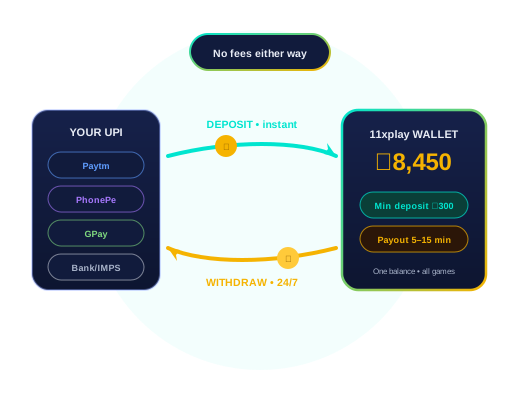
Everything about moving money in and out of your 11xplay wallet: the methods, the minimum, how long payouts usually take, and the few things that slow them down. Deposits from ₹300; withdrawals processed every hour of every day.
The One Rule That Keeps Your Money Safe
Pay only to the deposit details given to you in your own chat with our desk, at the time you deposit. We change payment details from time to time for operational reasons. A UPI ID or QR code forwarded through groups, posted on Instagram or sent by a “friend” may be old or may never have been ours at all. Asking the desk takes a minute and removes that risk completely.
The second rule is about names. Deposit from, and withdraw to, a bank or UPI account in the same name as your 11xplay ID. It’s the single biggest reason payouts go through without questions.
Nine Words From the Payments Chat
What the desk means when it uses them, and what to send back.
- Payment name
- The name on the bank or UPI account you pay from. It must match the name on your ID. Withdrawals go only to it.
- UTR
- The 12-digit reference every UPI or IMPS transfer carries. The desk can trace a payment from it in seconds. Send it with the screenshot.
- Screenshot
- The success screen from your payment app, showing amount, time and UTR. Not the pending screen. One screenshot per payment, in the chat.
- Credited
- The deposit has reached your wallet and the balance shows it. Usually minutes after the screenshot on UPI.
- Name mismatch
- The payment came from an account in a different name from the ID. It is refunded, not credited. The commonest reason a deposit “does not show”.
- Payout
- A withdrawal that has been processed and sent. UPI payouts usually land within 5–15 minutes; bank transfers can take hours.
- Open exposure
- Money held against bets that have not settled. It cannot be withdrawn until the markets settle, win or lose.
- Daily UPI limit
- Your bank’s cap on UPI per day, often ₹1 lakh. A failed deposit near that figure is the bank, not the desk. IMPS gets round it.
- Turnover
- The staking total a bonus requires before bonus money can be withdrawn. Your own deposit is never held by it.
Payment Methods and Typical Times
Withdrawal times are what most players see on a normal day. The next section explains what can make one take longer.
| Method | Deposit | Typical withdrawal | Our fee |
|---|---|---|---|
| UPI (Google Pay, PhonePe, BHIM, any UPI app) | Credited on confirmation | 5–15 min | None |
| Paytm | Credited on confirmation | 5–15 min | None |
| Bank transfer (IMPS) | Credited on confirmation | 15–30 min | None |
Minimum deposit on every method: ₹300.
How to Deposit and Withdraw
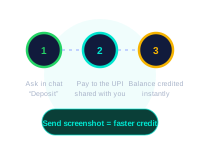
Depositing
- Message “deposit” and the amount in your desk chat
- Pay the exact details the desk sends, from an account in your name
- Send the UTR number or a screenshot
- Check your wallet once the desk confirms
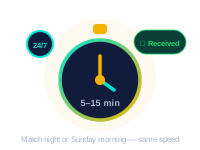
Withdrawing
- Message “withdraw” with the amount
- Give your UPI ID or bank account (same name as your ID)
- Check the details back before you confirm
- Track the payout in the same chat
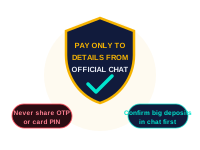
Never Needed
Your UPI PIN, an OTP, screen-sharing, or a “release fee”. No deposit or withdrawal requires any of them. Anyone asking is not our desk.
What Happens Between “Withdraw” and the Money Landing
A ₹5,000 UPI payout on a weekday evening. The times are typical, not guaranteed.
- You request it. From the wallet or by message. Amount and, the first time, the UPI ID in the payment name. After that the desk already has it.
- The name check. The destination must be in the payment name on the ID. This is the step that stops a stolen login from draining an account. It is not negotiable, even for family.
- Open-bet check. Balance minus exposure is what can go out. If a session is still running, that part waits for settlement and the rest is sent.
- Sent. The desk confirms in the chat with the amount and a reference. On match nights this step can take up to twenty minutes; the confirmation still comes.
- It lands. Check the bank app, not the panel. The panel shows the deduction the moment it is sent; the bank shows the arrival.
- If it has not landed. Send the reference back to the desk. UPI delays on the bank side happen; the desk can re-check the status. Thirty minutes is when to ask, not five.
Bank transfers: same steps, slower last mile. IMPS usually lands within a couple of hours; NEFT waits for the next batch and stops overnight.
Four Things That Hold a Withdrawal
- Name mismatch. The bank or UPI account belongs to someone else, or the spelling is quite different from your ID. The desk has to confirm it’s really you before paying.
- A mistyped UPI ID or account number. Read the details back before you confirm. A payment sent to the wrong ID can’t simply be pulled back.
- Unfinished bonus play-through. If you accepted a welcome bonus, the bonus money can’t be withdrawn until its play-through is done. Your own deposit is never locked this way. Details are on the bonus page.
- A first withdrawal. The first payout to a new account gets a quick check that the destination matches your ID. After that, the same details go through without it.
If a payout seems stuck, message the desk with the time you asked for it and the amount. Every request and every payment leaves a written trail in your chat, so it can always be traced.
Typical Payout Times by Situation
| Situation | Typical payout |
|---|---|
| Normal day, UPI, details already used before | 5–15 min |
| Big match night (busiest time) | Can run to the top of that range |
| IMPS bank transfer | 15–30 min |
| First withdrawal on a new ID | After a short check |
| Large amount | Confirmed in chat, may arrive as two or more transfers |
Large payouts sometimes arrive in parts because banks cap single UPI and IMPS transfers. The desk tells you the total and how it will be split before it’s sent. 11xplay Pro accounts get priority in the payout queue.
Which Way to Pay In, Compared
Four routes into the wallet. The right one depends on the amount and the time of day.
| UPI app | Bank IMPS | Bank NEFT | Cash via a friend | |
|---|---|---|---|---|
| Minimum | ₹300 | ₹300 | ₹300 | Not accepted |
| Credit time | Minutes | Minutes to an hour | Next batch, hours | — |
| Works at 11 pm | Yes | Yes | No | — |
| Daily cap | Bank UPI limit | Higher | Highest | — |
| What to send | Screenshot with UTR | Screenshot with UTR | Screenshot, reference | — |
| Name must match | Yes | Yes | Yes | Cannot, so refused |
| Our view | Default | For bigger amounts | Avoid on match nights | Never; it breaks the name rule |
The friend route gets asked about every week. It fails for a simple reason: the money then has to be withdrawn to the friend, not you, and the desk will not do that.
Payment Scams That Use Our Name
Money attracts the most confident-sounding scams. The patterns are always the same:
- “Pay a fee to unlock your withdrawal.” Release fees, tax payments and activation charges don’t exist here. Your winnings are never held behind another payment.
- A UPI “collect” request, or a request for your UPI PIN. Entering your PIN sends money out of your account. You never need it to receive money.
- An “agent” who deposits for you. Someone asks for cash or a transfer to their personal account and promises to load your ID. Deposit only to details from your own desk chat.
- Guaranteed wins or extra bonuses for paying a private number. No one can guarantee a result, and offers only come from the desk.
Spotted one? Send a screenshot to the desk so we can warn other players. More warning signs are in Is 11xplay real or fake? and our account security guide.
Payment Questions the Desk Handled This Week
Deposit and withdrawal chats only. Week of 20 to 26 October 2026. Updated at each review.
- Mon“Deposit not credited” after 90 seconds. Credited at the three-minute mark. Give UPI a few minutes before asking; the screenshot with UTR is what speeds it up.
- TuePayment from a brother’s PhonePe. Name mismatch, refunded to the brother, re-sent from the player’s own account and credited. No money lost, fifteen minutes used.
- WedWithdrawal held by an open session. Only the exposure portion waited. The free balance went out at once. Explained in the timeline above.
- FriA “11xplay payments” number asking for a deposit. Not ours. Deposit details come only inside the chat that issued the ID. The player had not paid; two others this month had.
- SatPayouts at 20 minutes during the double-header. Slower than the usual 5–15, every one landed. Match nights are the one time to expect the longer end of the range.
Two of the five were about patience, two about the name rule, one about a fake number. That ratio has held for months.
A Payment Checklist
Thirty seconds that prevent the refund-and-resend loop.
- You are paying to details sent inside the chat that issued your ID, today, not from a saved message.
- The account you are paying from is in the same name as your ID.
- You have the success screenshot with the UTR ready to send.
- For a withdrawal: the UPI ID you are giving is in the payment name, and no session is still running on the amount you want.
- It is not 6:55 pm. Pay before the rush or accept a slower credit.
What changed on this page
- Added the glossary, timeline, comparison table, desk log and checklist sections. Review date updated.
- Full rewrite in the desk’s own voice, panel header and login bar added, every claim checked against how the desk works.
- Related-guides block added, old backup files removed from the server, sitemap rebuilt.
Spotted something out of date? Say so in the chat and it is corrected at the next review.
Deposit & Withdrawal FAQs
What is the minimum deposit on 11xplay?
The minimum deposit is ₹300 by UPI, Google Pay, PhonePe, Paytm or IMPS bank transfer. Larger deposits are confirmed with you in chat before you pay, so you know the details are current.
How do I deposit on 11xplay?
Ask the desk for deposit details in your own WhatsApp chat, pay that exact account from a UPI app or bank in your name, then send the UTR number or a payment screenshot. The amount is added to your wallet once the payment is confirmed.
How long does a withdrawal take?
Withdrawals are processed 24x7, including Sundays and match nights. Most UPI payouts arrive in 5 to 15 minutes; IMPS bank transfers usually take 15 to 30 minutes. A first withdrawal or a large one can take longer while it is checked.
Are there deposit or withdrawal fees?
We do not charge a fee on deposits or withdrawals. If your bank or UPI app applies its own charge, that is between you and them.
My deposit has not shown in my wallet. What should I do?
Send the UTR number or a payment screenshot in your desk chat, with the amount and the time you paid. Most delays are a late bank confirmation, and the desk can match the payment by hand once it has the reference.
Why is my withdrawal on hold?
The usual reasons are a name on the bank or UPI account that does not match your ID, a mistyped UPI ID, bonus play-through that is not finished yet, or a first-withdrawal check. The desk will tell you which one in the chat.
Will 11xplay ever ask me to pay to release a withdrawal?
No. A real payout never needs a "release", "tax" or "processing" payment from you. Anyone asking for one is a scammer using our name.